Wors World
All About Wor

Mar
20
After creating a Sharepoint managed property, make sure you recrawl the content source again.
 
If you don’t do this Sharepoint will refuse to see your new carefully crafted property and ……..
 
You will experience "Sharepoint Rage" (I did anyway) as you test your custom search page (and code) for a long, long time
 
You will give up with your code and attempt to key the ManagedProperty:Value notation into the default search box
 
You wont have any luck
 
You will go home
 
You will surf the net until you discover the answer http://msdn.microsoft.com/en-us/library/cc751808.aspx – "12. Perform another full crawl so that you can do searches filtered by the managed property (see steps 1 through 4)."
 
Woo Hoo!
Woo Hoo!
Mar
20
Ever wondered why Microsoft always use the text:
 
"Lorem ipsum dolor sit amet, consectetuer adipiscing elit. Maecenas porttitor congue massa. Fusce posuere, magna sed pulvinar ultricies, purus lectus malesuada libero, sit amet commodo magna eros quis urna.
Nunc viverra imperdiet enim. Fusce est. Vivamus a tellus.
Pellentesque habitant morbi tristique senectus et netus et malesuada fames ac turpis egestas. Proin pharetra nonummy pede. Mauris et orci."
in their product adverts etc.?
 
If so, look here.  You can generate your own text by using the website or, if you have Microsoft Word 2007, open a document and type =lorem(10), hit enter.
Mar
20
I’ve been using the Business Data Catalog for the last few days to allow Sharepoint (SP) to crawl a SQL Database "data island".
 
Using the BDC Metaman, I created the Application Definition File (an xml description of the database tables and relationships), then imported them using SP Central Admin, this process creates an Application in SP.  From this application you can examine the entities and their data columns etc.  So far, so good.
 
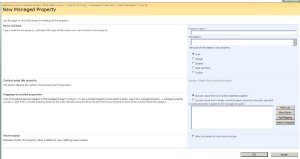
I then created a Search Center site and added some custom search pages.  Wanting to to add some propertys by which the user could search I went back to the SP Central Admin and set about creating a metadata property mapping – these mappings create a SP name for a data column (or columns) in the data source.
 
The first property I wanted to create was created no bother using the New Managed Property form :
 
The second was more problematic……..
 
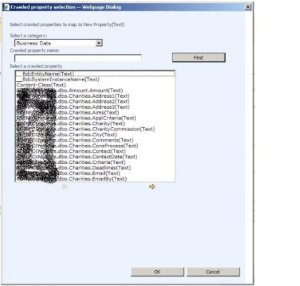
I clicked the New Managed Property button in SP Central Admin (http://myspserver:portnumber/ssp/admin/_layouts/schema.aspx) and was presented with the New Managed Property form.  I gave my new property a name, clicked the Add Mapping button and at the resultant dialog


I selected Business Data in the Select A Category and hunted for my db column – it wasn’t there.  I paged through the BDC from start to finish a numbe of times, selected other categories in the drop down, closed the dialog box and clicked the Add Mapping button and went back and forth once more – still not there.
 
I backed out of Managed Property and went back to the Application display to check that the column I wanted had in fact been imported correctly and sure enough  there it was.  Ok, "I’m doing something stupid" so went back through the create a Managed Property process – still no good.
 
"Aaaarrrrgggghhhh!", "What’s going on?". 
 
I scrolled through the Crawled Property dialog and noticed that the only data columns I was seeing were of type (Text) – "Odd?".  I checked the ADF and looked at the definition of the column I was after – (Int).  "Maybe that’s it?", SP can only handle Text fields – "No chance that would be crap".  In desperation, I closed the Cralwed Property Selection dialog and looked again at the New Managed Property form – I set the type of data to be selected and clicked Add Mapping again, the columns of type integer were there for all to see………..
 
This to my mind is a real "Gotcha!" and I was well and truly "Got!".
Mar
17
I forgot to post that I managed a 2.5 hour run a couple of weeks ago.  I managed about 15 miles according to www.gmap-pedometer.com.  Not too bad but stil not enough I thnk to have me tackle the www.ashby20.co.uk……….
Feb
23
I dropped out of a 2:20 run with Richard o  Saturday morning as he was leaving at 06:15 and I wanted a lie in after a hectic week of late nights, early morning and travelling back and forth to Macclesfield.
 
I went out on Sunday afternoon and managed a 9.5 miler up and down hills witha time of 1:20ish which I suppose wasn;t too bad for the terrain – my body aches today though – tomorrow should be a lot worse then 😦
Feb
21
Managed to get out on a run down the canal last Sunday.  It was absolutely freezing and the canal was covered in ducks sitting on top of the ice.
 
I ran with Mark and we made it to the usual short half way turning point in 22 minutes and returned in the same time.  All in all a useful run out but well below the time and distance that I used to be doing regularly.
Feb
01
I managed to get out of the office on Wednesday lunchtime to run with Adrian and a couple of others from UK CRN.  It was all very reminiscent of the "Experian Days" as we ran down the canal (and Adrian ran out of breath :-)).  The downside to this was there’s only a single shower shared by the office so getting showered and changed was a long drawn out affair as long as the actual run.
 
Saturday am saw me running 13 miles (according to Google Pedometer) in 2 hours – crap time but all miles.  I was so exhausted that I tripped and went my length twice.  Once on the canal side (almost head first in :-)) and once around the res.  I just couldn’t lift my feet high enough to clear the rock and the tree roots that I tripped over :-(.  I had a moment of panic when I saw my right knee all battered and swollen but it looks to be surface damage only.  The rest of the day was spent resting from the effort of my longest run in over 12 months.  I suppose the bright side is it’s only a couple of months that I started back to running with 10 laps of the rec so to get to 13 is ok – If I’d been on my marathon trainig year (2005) I’d probably only have got to about 13/14 or so miles anyway, but my time would have been much quicker.
 
To run faster and further I must run faster and further….
Jan
18
Managed to fit in a 7.5 mile run on Saturday night.  The time wasn’t great (around 70 minutes) but it’s all miles in the bank.
Jan
10
I’ve continued with the running, managing a few runs of 6 – 8 miles with a few gruesome (with my current fitness levels) hill climbs and today I was out with Bunde @ 08:00 to run for 90 minutes.  It was absolutely freezing all the way round, when I finished I called in at the local co-op and noticed the the backs of my woollen gloves were completly covered in ice!
 
Using the Gmaps Pedometer app showed the distance to be a smidgen short of 9 miles (which I’m happy to round up to 9 miles) and fairly hilly track.  We completed it in exactly 90 minutes – 10 minute miles, not good.  Miles 2 – 4 are a climb, followed by a steep descent to mile 5 then up and down all the way to the finish.  At about 5.5 miles there’s a fairly short, sharp incline which just about had me done in – I could feel the energy draining from my head down to my toes and I was glad to get to the top without stopping, vomiting or passing out, but it was a close run thing :-).
 
Anyway, I’d took the precaution of popping a couple of Ibruprofen before I went and I’ve had a couple since which have saved me from the full horrors of my overworked legs – tommorow maybe a different matter though.
Dec
29
We’ve noticed that the chickens have been losing feathers for the last week or so.  We wondered if it was something that we were doing (or not doing).  We’ve Googled this and noticed that chickens do moult maybe once a year and that it usually coincides with a break in egg laying (which we’re also experiencing having only 2 eggs in the last week or so).  It seems like chickens moult for 2 – 3 weeks or so so we’re probably half way through.
Design a site like this with WordPress.com
Get started